
As a prospective student, advising is one of the most important steps in finalizing your enrollment in your new program. You may have questions about which courses to take, how your transfer credits apply toward your degree or how much time remains until graduation. We’re here to guide and support you every step of the way! Here are a few steps you can expect prior to registering.
Scheduling an Advising Appointment
- You’ll schedule your first meeting with our online advising team after you’ve accepted and completed the Online Programs Orientation.
- After orientation you will receive a link to our New Student Orientation Appointments. This advising appointment will take approximately 45 minutes.
- You’ll have the option of a video or phone appointment.
- During your first advising session, you will review recommended courses for registration and receive an overview of your degree plan.
- You will be assigned an Academic Advisor and encouraged to meet with them at least once per semester.
Registering for Classes
Read below for additional information on registering for classes.
- Before your advising appointment, take a few minutes to review your DegreeWorks. If you notice any transfer credits that are missing or have not yet been applied, write them down so you and the advisor can look at this during your meeting.
- Make sure all your registration holds have been cleared prior to your advising appointment. Please see “Registration Eligibility” below to guide you through removing any obstacles preventing you from registering.
- TSI Testing: If you are a new incoming freshman or transfer who has not taken English, Math or both, you will be required to take the Texas Success Initiative (TSI) Exam. Be sure you have taken this exam and have results available prior to your advising appointment, or you won’t be able to register for classes. For more information, please visit our Testing Services site.
- Prepare any additional questions you have about your degree.
These steps help us make the most of your time and ensures we keep everything on track for your program.
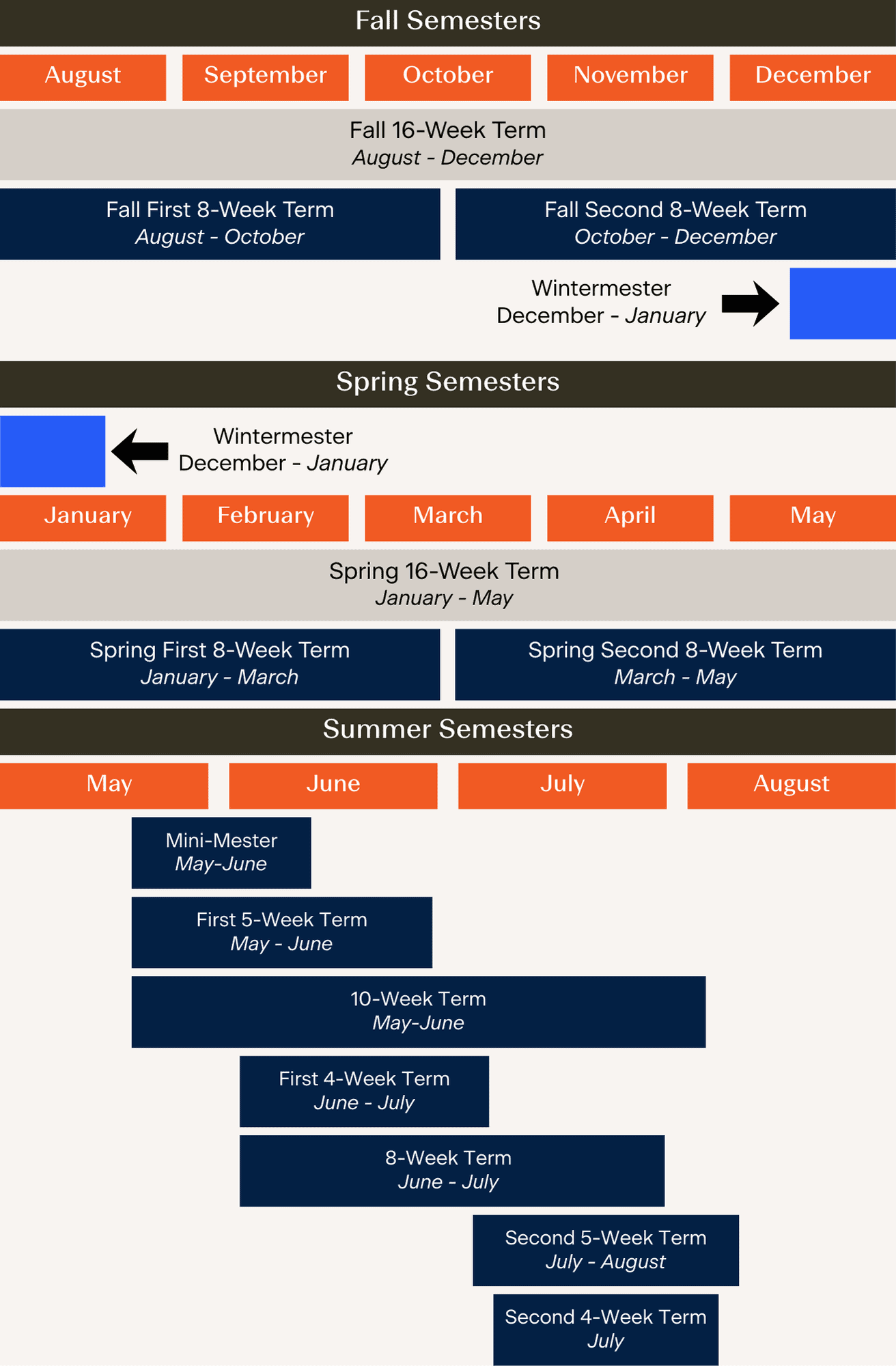
Classes are offered in a mix of term lengths:
- Fall/Spring Options: 8-week and 16-week
- Summer Options: 3-week, 4-week, 5-week, 8-week, and 10-week
- Wintermester Option: 3-week
Terms are indicated by the “Start” and “End” dates in the “Meeting Time” column. (Click and drag the border of the “Meeting Time” column to see the full text.)

Students may choose any combination of class lengths but must still adhere to the semester credit hour limits in the UT San Antonio Student Policies (students on Academic Warning or Academic Probation may have further limitations on the number of hours they may enroll in for each term).
Registration Eligibility
Registration usually opens a couple of months before the semester begins. You can view the exact dates on the Registration Calendar for each term. Before registration opens, it is best to review your Registration Status, take care of any registration holds, and start planning your schedule. You can view the class schedule and register for classes through your myUTSA Account.
Make sure you are ready to go once registration opens up for you. Your Registration Status will let you know if you are all set to register or if you have anything you need to take care of that would prevent registration.
- Log into myUTSA Account
- On your myUTSA Account , click on the Main Menu (top left) and select “Student Services”
- Under the Menu: Registration & Records card, click on “App Student Profile button”
- At the top in the dark strip, you can view your registration status by clicking on Registration Notices
There are various registration holds that can prevent you from registering. You should check your holds regularly to ensure you are eligible to register for the upcoming semester. Have a hold? Don’t worry. We encourage you to work with the respective office to resolve any holds so you can register.
- Log into myUTSA Account
- On your myUTSA Account , click on the Main Menu (top left) and select “Student Services”
- Under the Menu: Registration & Records card, click on “App Student Profile button”
- At the top in the dark strip, you can view your holds by clicking on Holds
Below are some common holds that prevent registration. We encourage you to resolve any registration holds quickly so you can register on time and secure the schedule you want. You can view all holds in your myUTSA Account.
Admission Hold
Students who have an admission hold often have it due to missing official transcripts (final high school or college/university transcripts). Your myUTSA Account will provide more information on the type of outstanding document(s), so you can turn it in as quickly as possible to One Stop.
Orientation Hold
All first-time undergraduate students (freshman, freshman-transfers, and transfers) must complete orientation before they can register. You can sign up for orientation through your myUTSA Account. Once you have completed orientation, the hold will be removed. For more information, visit https://future.utsa.edu/orientation.
Probation or Dismissal Hold
Students who have been academically dismissed and reinstated on probation must speak with an academic advisor. Please reach out to them to take care of your hold so you can register for classes next semester. Find out more information about your hold in your myUTSA Account Classic View.
Advising Hold
In order to stay on track with your degree, you will need to occasionally meet with an academic advisor. If you have an advising hold, you are required to speak with your Academic Advisor. Please reach out to them to take care of your hold so you can register for classes next semester. Find out more information about your hold in your myUTSA Account Classic View.
Graduate School Hold
This hold requires you to speak with the Graduate School. Please contact the Graduate School at 210-458-4331 to learn more about your hold and how to resolve it.
Financial Hold
This hold is typically placed when you have an outstanding balance with UT San Antonio. You can make a payment in your myUTSA Account or contact Fiscal Services at 210-458-8000 (Option 4) for questions.
International Hold
If you have a registration hold related to you being an international student, please log into your myUTSA Account Classic View to view your hold and complete what is needed. If you have an “International Programs” hold, please contact them at 210-458-7202.
Student Conduct Hold
If you have a student conduct hold, please contact Student Conduct and Community Standards at 210-458-4720 to resolve your hold.
TSI Hold
You have a Texas Success Initiative (TSI) hold on your account that prevents you from registering. If you need assistance with test score retrievals, developmental course registration, or TSI advising, contact TSI Programs at 210-458-4498 or email [email protected]. If you need to schedule your TSI assessment, you can do this online through your myUTSA Account. You will first need to complete the Pre-Assessment Activity (PPA). If you have questions about taking the TSI exam, you can contact Testing Services at 210-458-4125 or email [email protected].
Library Hold
If you have a library hold, please contact the UT San Antonio Libraries at 210-458-4889 to resolve your hold.
Other Holds
If you do not see one of your holds listed, we would encourage you to contact the department that placed the hold on your account for more information. You can also contact a UT San Antonio Online enrollment counselor at 210-458-4000 so they can assist you.